Monday, 25 May 2015

Slide : Get Started With Microsoft Azure Virtual Machine


During MVP Community Day (2015), we have delivered an online session about “Get started with Microsoft Azure Virtual Machine”.

mvp

The target audience is for those who are beginner and would like to learn about Azure Infrastructure as a Service.

During an hour session, here is a sneak peak of the system that we use. The system was quite easy to use.

image

Thanks to the support team that assisting during the session.

Slide

Recording

You can view from MVP Community Portal – Click here and proceed to the our title.

image

image

Thursday, 14 May 2015

Configure Site to Site VPN to Microsoft Azure Using RRAS

In our previous post, we have talked on building RRAS to connecting two subnet and network address translation. If you’re interested, feel free to check out here.

Next, we are going to embark a journey to Hybrid Cloud by connecting to Microsoft Azure by using RRAS.

[ Scenario]

Site2Site

Continue from previous post setup. We are changing it to include demand-dial.

[ Before – on Azure]

Create Virtual Network and create dynamic VPN Gateway. Take note and Gateway IP Address and Pre-Shared Key

s2s2

s2s3

[ Configuration on RRAS]

1. Modify to include demand dial. Set LAN and demand dial routing on Ipv4 router

s2s4

s2s5

2. Add a demand dial interface and modify accordingly

S2s6

S2S7

3. Connection type set to VPN

S2S8

4. VPN Connection set to use IKE v2

S2s9

5. Enter Azure VPN Gateway IP that you have created on previous step

S2s10

6. Tick Route IP Packet on this interface and enter destination route detail (enter Azure virtual network information)

s2s11a

s2s11b

7. On Credential, leave it empty. We are going to set pre-shared key later.

s2s12

s2s13

8. Modify the demand dial interface. Go to security tab and set to use pre-shared key

S2S14

[ Verification]

  • Try establish connection from RRAS
  • Connect on Azure Portal

s2s15

s2s16

Yeah! Both reported connected

To make sure that both side can access, perform ping test and tracert.

[ Test result]

From Azure VM to on-prem DC VM

result from azure

From on-prem DC VM to Azure VM

result from on-prem

Easy right!  That’s concluded our configuration to establish site to site vpn to Microsoft Azure by using RRAS.

Tuesday, 5 May 2015

Veeam FastSCP For Microsoft Azure Beta Available


image

It is time for us to disclosed news about new beta version Veeam FastSCP that can support for Microsoft Azure Virtual Machine. Previously it was build for Vmware ESX/ESXi File Management which allow user to copy files from ESX to Windows, Windows to ESX, or directly ESX to ESX to ESX. Veeam claimed Veeam FastSCP can copy files 6x faster than WinSCP and other SCP based tools. Hmmm…

Now where does this beta tool fit?

Well, for those who are often copying data into/from Microsoft Azure may find this tool is useful. Prior of this tool, we often use:

  • 1st method -use “Copy & Paste” feature. But this feature has a 2GB limit and suitable for smaller file. Sad smile

How about big data till 900+ GB of data?

  • 2nd method - copy a data into an empty virtual disk, upload to Azure Storage and attach virtual disk. But this method is not flexible and may take longer period. Sad smileSad smile

So the solution that come to the rescue is….

“Veeam FastSCP” – It’s FREE! which allow us to secure file copy for Azure VM. Here is some key functionality about the product:

  • Reliable copy of file of local files to Azure VM and files in Azure VM to on-premises
  • Secure file copy with no independent encryption or VPN needed
  • Copying files without UI open until the file copy completes
  • Automatic scheduling of file copy jobs for nightly or weekly copies to/from Azure VM
  • No scripting needed. (Just a few click inside a wizard driven UI)

Let have a quick walkthrough:

1. Connection to Azure VM is using port 5986 (Powershell port). Therefore it only work on Windows VM.

image

2. Once connected, able to view Azure VM Volume and you may start your operation.

image

3.Here is a couple of action that you can perform

image

4. View progress from Job & History. You can enable pause & resume the job.

image

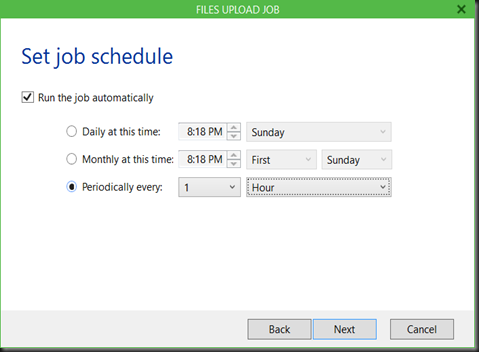
5. To configure scheduling, just modify the existing job. It can be everyday copy a backup of database from on-premise/azure back to azure VM/on-premise. It like having an orchestrator that continuously execute a job.
image

Meanwhile, during our veeam briefing session, there is no limit of size that you can transfer.

Well, you probably would like to give it a test and see does it work as expected. Smile

Do you find this tool handy?  If yes, please feel free to download from here. Enjoy!

Saturday, 25 April 2015

Slide : Disaster Recovery to the Cloud with Microsoft Azure


During Global Azure Bootcamp (2015), i have presented about data protection and site recovery  to protect your workload with one solution for  different infrastructure either hyper-v, vmware, storage or physical server.

Agenda during Global Azure Bootcamp (Malaysia):

IMG_20150425_091936

Event pictures:

IMG_20150425_083901_HDRIMG_20150425_084348_HDRIMG_20150425_084430IMG_20150425_084446IMG_20150425_084517

My session:

123


Join the Racing Game Lab (available now till end of this weekend). How to participate, please follow the link as posted in below picture

IMG_20150425_085831IMG_20150425_090000

Slide

Demo video

Demo 1:- Recovery data on laptop from Microsoft Azure by using Microsoft Azure Backup

Description:- In this demo, we show how easy to recover a data when you’re mobile. As long you have laptop and Internet connection, able to use Microsoft Azure Backup to restore data.

Demo 2:- Recover Azure Virtual Machine by using Microsoft Azure Backup

Description:- We can now protect Azure VM by using Azure Backup from the management portal.

Demo 3: ASR Scenario : Hyper-V to Azure

Description:- In this scenario we got 2 workload running on Microsoft Hyper-V (DB & Web). We configure to replication to Microsoft Azure by using ASR. From there, we can perform planned, unplanned and test failover. In this demo, we have executed test failover and clean up after complete our testing.

Demo 4: ASR Scenario:- Vmware/Physical Server to Azure

Description : In this demo, we have look into how easy to move your existing VMware VM or physical server to Microsoft Azure by using ASR with Inmage Scout technology

Demo 5: ASR Scenario:- Vmware to Vmware using Inmage Scout

Description: In this demo, we use Inmage Scout to configure a protection from Vmware host at primary site to secondary site which using Vmware host as well.

Thursday, 16 April 2015

MVA Video– Best Course to Learn About Microsoft Azure

microsoft_ITHero_banners_02

In the trend to Cloud, we all are challenged with business requirements that calls for faster go-to-market, build and deploy infrastructure that hosts apps or services faster than ever before, and be able to scale and adopt to changing requirements and demand.

Microsoft Azure empowers you to achieve that through the solutions that you are familiar with, be it 3rd party or Open Source, and DevOps tools that help scale your solutions.

Learn through a series of courses to get started with fundamentals, deep dive into scenarios for disaster recovery, and the use of OSS technology on Cloud.


Establish the Foundation: Core IaaS Infrastructure Technical Fundamentals

Get a good look at Azure IaaS virtual machines, inside and out. Learn to optimize your Windows Server workloads on Azure, and dig into IaaS architecture and management best practices.

Watch this MVA from here

Dive Deep into Networking, Storage, and Disaster Recovery

Get the details on high value cloud scenarios like storage and disaster recovery. Explore networking and hybrid connectivity to extend your datacenter, and find out how new tools and capabilities simplify migration.

Watch this MVA from here

Embrace Open Source Technologies to Accelerate and Scale Solutions

Focus on open source technologies on Azure. Explore how to best deploy and manage a Linux environment with tools you know and use today. Learn how to use your existing Chef and Puppet configurations and how to scale new ones to massively scale and deploy your solutions.

Watch this MVA from here

Saturday, 11 April 2015

Backup and Restore Azure Virtual Machine Using Azure Backup

Recently we have posted a walkthrough on how to perform backup and restore Azure VM. A lot of people tend to ignore backup and to get everyone perspective correct, it is crucial to backup and it is the duty of consumer to perform it rather than MSFT. To make thing easier, microsoft has released a public preview of Azure Backup to backup Azure VM. Do check out our recent post at www.ms4u.info (parent site). Enjoy below shortcut link to our post:

Saturday, 28 March 2015

Bulk Remove Azure Active Directory User and Group Using Powershell


[Scenario]

  • Using Azure Active Directory
  • Has used AAD Sync to sync on-premise user account and group
  • Discovered has accidently sync user account and group to Azure Active Directory but require to remove it.

It’s quite a painful experience to delete each individual user account and group from Azure Management Portal. Wonder why no multiple select option and quite annoying when it asking for confirmation and refresh. But lucky enough got powershell to do the job.

[Pre-requisite]

[ Configuration]

After install the pre-requisite, open the Azure Active Directory Module for Windows Powershell.

Connect to Azure Active Directory by entering the Global Administrator account.

$msolcred = get-credential
connect-msolservice -credential $msolcred

Export the user account to csv file format


Get-MsolUser –All | Export-CSV C:\users.csv

Open the csv file and remove the Microsoft account and Global Administrator account. We just want to remove others account and retain the Global administrator account.


Export the group to csv file format


Get-MsolGroup –All | Export-CSV C:\Groups.csv

Final step is start to remove bulk users account and groups


Remove Users


Import-CSV C:\Users.csv | Remove-MsOlUser –Force

Remove Groups


Import-CSV C:\Groups.csv | Remove-MsOlGroup –Force

Deletion process is quite long period if you’ve more than 8000 records.